Blog & Insights

Expert insights on custom software development, AI integrations, and real stories from businesses we've helped grow.

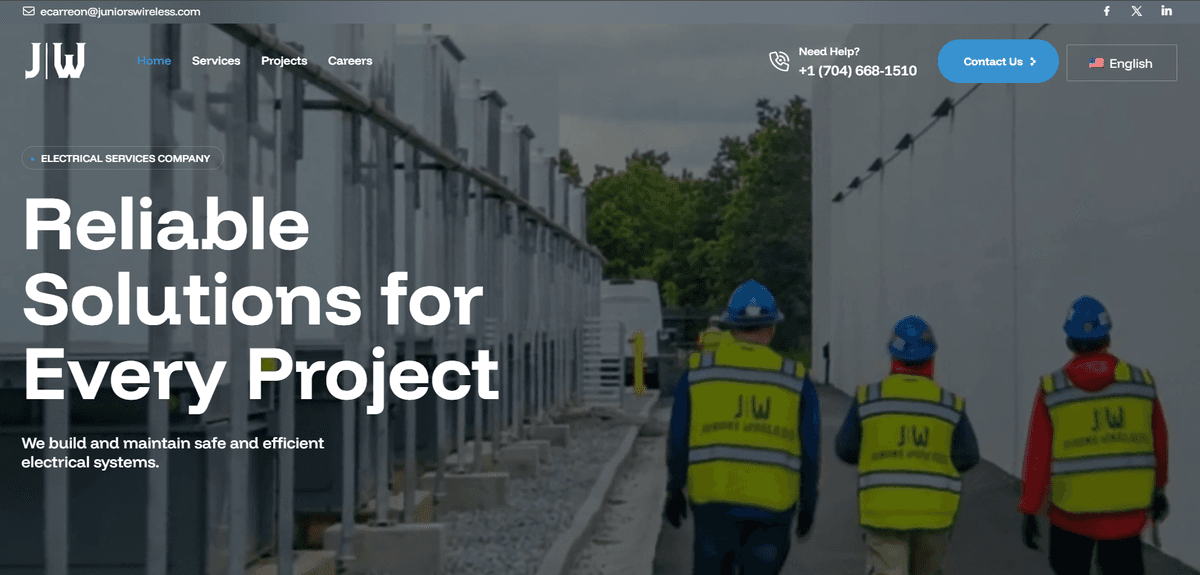
How Juniors Wireless Increased Conversions with a Modern Website Redesign

How Juniors Wireless Increased Conversions with a Modern Website Redesign

When Juniors Wireless approached us, they had a challenge many growing businesses face: their website wasn't converting visitors into customers. Despite offering excellent cellular and internet services in the Bay Area, their online presence didn't reflect the quality of their service.

The Challenge

Juniors Wireless needed a website that could:

  • Clearly communicate their value proposition to both residential and business customers
  • Showcase their service areas and coverage
  • Make it easy for visitors to request quotes and contact them
  • Reflect their professional brand and build trust
  • Load fast and work flawlessly on mobile devices

Their existing site was outdated, difficult to navigate, and didn't inspire confidence in potential customers evaluating their services.

Our Solution

We designed and built a modern, conversion-focused website with:

Clean, Professional Design: A fresh visual identity that positions Juniors Wireless as a trusted provider in a competitive market.

Clear Service Presentation: Intuitive navigation that helps visitors quickly find information about cellular plans, internet packages, and business solutions.

Mobile-First Approach: With most visitors browsing on mobile devices, we ensured the site looks and performs perfectly on all screen sizes.

Fast Performance: Optimized loading times to keep visitors engaged and improve search engine rankings.

Strategic CTAs: Well-placed calls-to-action that guide visitors toward contacting the team or requesting a quote.

The Results

Since launching their new website, Juniors Wireless has seen:

  • Improved time-on-site as visitors engage with content more effectively
  • Higher conversion rates from visitors to leads
  • Professional presentation that differentiates them from competitors
  • Positive feedback from customers about the ease of finding information

What the Client Says

"Greenbyte Studios delivered a professional, modern website that truly represents Juniors Wireless. The team understood our needs and created a site that our customers love. We've seen a real difference in how visitors interact with our site and the quality of inquiries we receive." — Robert Chen, Operations Manager at Juniors Wireless

Technologies Used

We built the site using modern, proven technologies:

  • Next.js for optimal performance and SEO
  • Tailwind CSS for a polished, responsive design
  • Vercel for reliable, fast hosting

Ready to transform your online presence? Whether you need a new website, a web application, or business automation, we're here to help. Get in touch to discuss your project.

5 Signs Your Business Needs Automation (And What to Do About It)

5 Signs Your Business Needs Automation (And What to Do About It)

Are you spending too much time on repetitive tasks? Is your team drowning in spreadsheets and manual processes? You're not alone. Many growing businesses reach a point where manual workflows become bottlenecks to growth.

Here are five clear signs that your business would benefit from automation—and what you can do about each one.

1. Your Team Spends Hours on Repetitive Tasks

The Sign: Your employees are copying data between systems, generating the same reports manually each week, or performing the same sequence of steps dozens of times a day.

The Impact: Time that could be spent on strategic work is wasted on monotonous tasks. Employee morale suffers, and you're paying skilled workers to do work that software could handle.

The Solution: Identify your most time-consuming repetitive tasks and build custom workflows that handle them automatically. Whether it's data entry, report generation, or routine communications, automation can reclaim those hours.

2. You're Scaling, But Your Systems Aren't

The Sign: Your business is growing, but your processes are starting to break down. What worked for 5 employees doesn't work for 20. Manual processes that took an hour now take five.

The Impact: Growth becomes painful instead of exciting. You hire more people just to keep up with administrative overhead, not to drive the business forward.

The Solution: Build scalable systems that grow with your business. Custom dashboards, automated workflows, and integrated tools ensure that growth doesn't mean chaos.

3. Critical Business Data Lives in Spreadsheets

The Sign: Your team relies on Excel or Google Sheets for inventory, customer data, project tracking, or financial reporting. Files are passed around via email or shared drives.

The Impact: Data is inconsistent, outdated, or lost. You can't get real-time insights. Multiple versions create confusion. Finding information takes too long.

The Solution: Transform spreadsheets into proper databases with custom applications. Get real-time dashboards, automated reports, and a single source of truth for your business data.

4. Your Systems Don't Talk to Each Other

The Sign: You're using great tools (CRM, accounting software, project management, inventory systems), but they're all isolated islands. Data has to be manually copied between them.

The Impact: Information silos create inefficiency and errors. Your team wastes time on data entry. Customer information in your CRM doesn't match your billing system.

The Solution: Build integrations that connect your tools automatically. When a sale closes in your CRM, it should automatically update your accounting system, trigger fulfillment, and notify your team—no manual work required.

5. You Can't Get the Reports You Need

The Sign: Your existing software doesn't provide the specific metrics and insights your business needs. You're either flying blind or spending hours manually compiling data.

The Impact: You can't make data-driven decisions quickly. By the time you have the information you need, the moment has passed.

The Solution: Build custom dashboards and reporting systems that show exactly what matters to your business in real-time. See your KPIs at a glance and drill down when you need details.

What's Next?

If you recognized your business in two or more of these signs, automation could save you significant time and money while positioning you for sustainable growth.

The good news? You don't need to tackle everything at once. Start with the pain point that's costing you the most—whether that's time, money, or sanity—and build from there.


Ready to explore automation for your business? We help companies identify automation opportunities and build custom solutions that fit their specific needs. Schedule a free consultation to discuss what's possible for your business.

From Excel to Dashboard: Transforming Your Business Data

From Excel to Dashboard: Transforming Your Business Data

Excel is powerful. We all know that. It's flexible, familiar, and can handle an enormous variety of tasks. But as your business grows, Excel spreadsheets become a liability. Here's why—and what to do about it.

The Excel Problem

When businesses rely on spreadsheets for critical operations, several problems emerge:

Version Control Nightmares: Which file is the latest version? Is it the one on your desktop, in your email, or on the shared drive? When multiple people work with spreadsheets, chaos ensues.

No Real-Time Insights: By the time you open your sales spreadsheet, compile data, and create charts, the information is already outdated. In fast-moving markets, yesterday's data isn't good enough.

Error-Prone Manual Work: One typo, one wrong formula, one accidental deletion can corrupt weeks of data. And unlike proper databases, there's often no audit trail to track what changed or who changed it.

Doesn't Scale: A spreadsheet with 100 rows works fine. What about 10,000 rows? 100,000? Performance degrades, formulas break, and files become unwieldy.

Limited Collaboration: Only one person can edit at a time (in traditional Excel). Even with Google Sheets, simultaneous editing gets messy fast with complex spreadsheets.

No Access Control: Everyone with access to the file can see (and potentially change) everything. You can't give your sales team visibility into their numbers without also showing them everyone else's compensation.

The Dashboard Solution

A custom dashboard transforms how you interact with your business data:

Single Source of Truth: All data lives in a proper database. Everyone sees the same information, updated in real-time. No more "which version is correct?"

Real-Time Visibility: See your metrics update as events happen. Sales close, inventory ships, customers sign up—your dashboard reflects reality immediately.

Protected Data with Audit Trails: Proper databases track every change: who made it, when, and what it was. Accidental deletions can be recovered. Suspicious changes can be investigated.

Built for Scale: Handle millions of records without breaking a sweat. As your business grows, your dashboard grows with it.

Role-Based Access: Show salespeople their pipeline, managers their team's performance, and executives company-wide KPIs—all from the same system with appropriate permissions.

Automated Reporting: Stop manually generating weekly reports. Schedule them to be created and emailed automatically. Better yet, give stakeholders direct access to always-current dashboards.

Real-World Example

Consider a growing manufacturing company using Excel to track:

  • Inventory levels across multiple warehouses
  • Customer orders and fulfillment
  • Production schedules
  • Supplier deliveries
  • Quality control issues

Each department maintains their own spreadsheets. The operations manager spends 10 hours every week compiling data from all these sources to get an overview of the business.

After moving to a custom dashboard:

  • All data feeds into a central database automatically
  • Real-time inventory visibility prevents stockouts and overordering
  • Production schedules automatically adjust based on current orders
  • Quality issues trigger alerts immediately
  • The operations manager gets their weekly overview in 30 seconds instead of 10 hours

Making the Transition

Moving from spreadsheets to a proper system might seem daunting, but it's more straightforward than you think:

  1. Identify Your Pain Points: Which spreadsheets cause the most problems? Start there.

  2. Map Your Data: What information do you track? How does it relate? This becomes your database structure.

  3. Design Your Views: What do different people need to see? How should information be presented?

  4. Build Incrementally: You don't need to replace everything overnight. Start with one critical area and expand.

  5. Train Your Team: A new system is only valuable if people use it. Proper training ensures adoption.

The Bottom Line

Excel isn't evil—it's just not designed for what you're using it for. As your business grows, the "Excel-for-everything" approach becomes a competitive disadvantage.

Custom dashboards and proper databases don't just solve technical problems. They change how your team works: less time fighting with spreadsheets, more time making informed decisions that drive your business forward.


Is your business ready to move beyond spreadsheets? We specialize in transforming Excel-dependent workflows into proper systems with real-time dashboards. Let's talk about your specific needs and explore what's possible.

Why Growing Businesses Choose Custom Software Over Off-the-Shelf Solutions

Why Growing Businesses Choose Custom Software Over Off-the-Shelf Solutions

When your business needs new software, the instinct is often to find an existing solution: "There must be a SaaS product that does what we need." And sometimes there is. But increasingly, growing businesses are choosing custom software instead. Here's why.

The Off-the-Shelf Promise (and Reality)

Commercial software promises simplicity: sign up, pay monthly, and get a solution that works right away. For commodity needs (email, document storage, basic CRM), this makes perfect sense.

But here's what often happens:

Feature Overload: You pay for 100 features but only use 10. The interface is cluttered with options you don't need.

Feature Gaps: You need just a few specific capabilities that the software doesn't offer. No amount of clicking through menus will make those features appear.

Forced Workflows: The software assumes a certain way of working. If that's not how your business operates, you either adapt your processes to the software or fight it constantly.

Integration Headaches: Your SaaS CRM doesn't talk to your SaaS inventory system. Now you need third-party integration tools (more monthly costs) or manual data entry.

Subscription Creep: $50/month seems reasonable. Then you need more users. Then premium features. Then integrations. Suddenly you're paying $500/month for software that almost meets your needs.

The Custom Software Advantage

Custom software flips this model. Instead of adapting your business to the software, the software adapts to your business.

You Get Exactly What You Need

No more, no less. Every feature serves a purpose for your specific business. The interface shows what matters to you, laid out in a way that makes sense for how your team works.

It Integrates Seamlessly

Because it's built for your ecosystem, custom software can integrate directly with your existing tools, databases, and workflows. No third-party middleware required.

You Own It

With SaaS, you're renting access month after month. With custom software, you own it. No monthly fees that increase every year. No features that get deprecated or changed without your input. No vendor suddenly doubling their prices.

It Scales With You

As your business grows and changes, your software can evolve with it. Need a new feature? Add it. Workflow changed? Update it. Expanding to new markets? Adapt it.

Competitive Advantage

Your competitors can buy the same SaaS products you use. But they can't replicate your custom software that's optimized for exactly how your business operates.

When Custom Makes Sense

Custom software isn't always the answer. It makes the most sense when:

Your Process Is Your Competitive Advantage: If how you do things is what sets you apart, don't force-fit it into generic software.

You Have Specific Integration Needs: Multiple systems that need to work together seamlessly? Custom integration can be cheaper and more reliable than SaaS + middleware.

You're Doing High-Volume Operations: When you're processing thousands of transactions, the per-user or per-transaction pricing of SaaS adds up fast. Custom software has no per-use costs.

Off-the-Shelf Almost Works: If you find yourself saying "this product is great except for X, Y, and Z," custom software might cost less than the expensive enterprise tier of the SaaS product—and do exactly what you need.

You're Tired of Workarounds: If your team has developed elaborate workarounds to make your current software work, those workarounds are costing you time and money every day.

The Investment Perspective

"But custom software is expensive!" Yes, the upfront cost is higher than signing up for a $50/month SaaS product.

But consider:

  • That SaaS subscription costs $600/year. Over 5 years, that's $3,000—and prices typically increase.
  • Add the cost of workarounds, manual processes, and integration tools.
  • Factor in the productivity lost when software doesn't quite fit your needs.
  • Consider the competitive disadvantage of using the same tools as everyone else.

Many businesses find that custom software pays for itself within 1-2 years, and continues providing value with no ongoing subscription costs.

How to Approach It

If custom software makes sense for your business:

  1. Start With Your Biggest Pain Point: Don't try to replace everything at once. Build what will have the biggest immediate impact.

  2. Document Your Needs Clearly: The better you can articulate what you need and how it should work, the better the result will be.

  3. Plan for Evolution: Build with future growth in mind, but don't over-engineer for hypothetical scenarios.

  4. Choose the Right Partner: You need a development team that understands business problems, not just technology.

The Bottom Line

Off-the-shelf software is like buying clothes off the rack. Most of the time, it's good enough. But when fit really matters—when what you wear impacts your performance—you go custom.

The same principle applies to software. For commodity needs, use commodity solutions. But when software is central to how you operate, when it's part of your competitive advantage, when you need it to work exactly the way your business works—that's when custom makes sense.


Wondering if custom software makes sense for your business? We help companies evaluate their options and build solutions that drive real results. Schedule a free consultation to explore what's possible.


Weekly Update: Stellar X

Weekly Update: Stellar X

Lorem ipsum dolor sit amet, consectetur adipiscing elit, sed do eiusmod tempor incididunt ut labore et dolore magna aliqua. Ut enim ad minim veniam, quis nostrud exercitation ullamco laboris nisi ut aliquip ex ea commodo consequat.

Duis aute irure dolor in reprehenderit in voluptate velit esse cillum dolore eu fugiat nulla pariatur excepteur sint occaecat cupidatat non proident.

Refreshed main menu navigation

Refreshed main menu navigation

Better align your teams and partners around standardized product principles and consistent implementation standards using the latest architecture shape pack.

  • Streamline intake with workflows, templates, and automations
  • See realtime updates in Slack and get notified when your task is complete
  • Receive requests in Stellar in a shared team inbox

Subscribe to get notified of key changes in the views you care about most. Opt-in to receive a notification when tasks are added to the view or when issues are completed or canceled.

New cloud architecture

New cloud architecture

Newly created diagrams are now editable, full screen mode for more editing real estate, and both apps are updated to the latest version supporting new diagram types (eg. C4 architecture).

Create professional-looking diagrams with line jumps, making it easy to navigate complex diagrams with ease. You can also apply jumps to individual lines or the entire diagram.

Updates to the Filtering API

Updates to the Filtering API

We understand that who you've worked with in the past is often who you'll work with in the future, and are now placing a higher emphasis on making your past mentions more accessible. This means your previous collaborators will be front and center, ready for future collaboration.

Never miss an update

Take control of your business

Find out about our latest product changes as we continue improving Stellar to enable your team to collaborate better.